Understanding Wi-Fi Connectivity Issues with Space Heaters
Imagine you just settled into your cozy living room, ready to enjoy a warm evening. You reach for your smart space heater, anticipating the convenience of controlling it from your phone. But wait—your space heater won’t connect to Wi-Fi. This frustrating situation can happen to anyone, especially in a world where smart home devices are becoming the norm.
This article will guide you through common reasons why your space heater may not be connecting to Wi-Fi and how to troubleshoot these issues. You’ll also discover tips for using your smart heater, like the MORENTO Space Heater, which offers Wi-Fi and voice control features.

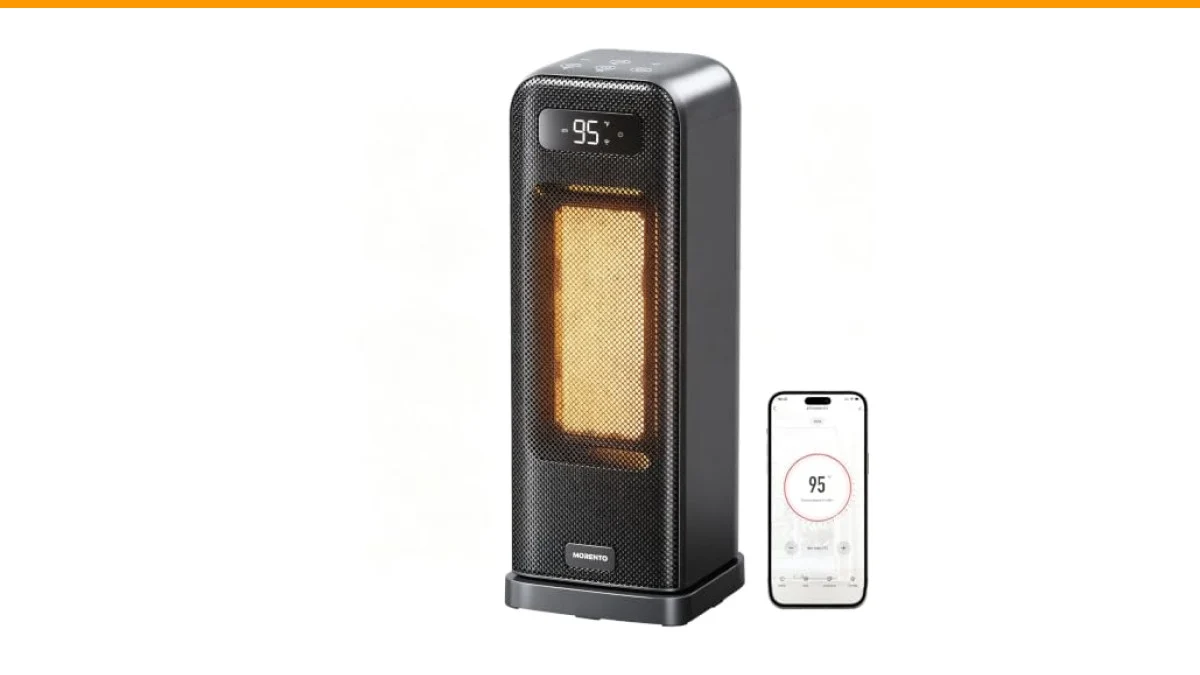
MORENTO
MORENTO Space Heaters for Indoor Use, Smart Space Heater, Wi-Fi & Voice Control, Portable Heater with Thermostat, 1500W Electric Heater, 12H Timer, Quiet Space Heater for Office Bedroom Home (Black)
- Smart Control: Note: Only Support 2.4G Wi-Fi. Wi-Fi remote control and voice control create a convenient life! Space heaters for i…
- Safe and Reliable: The body of the heater is made of V0 grade flame retardant material, electric heater with multiple safety featu…
- Quiet Heating: Space heaters for indoor use engineered new airflow design brings down noise as low as 36dB, making this electric h…
The MORENTO Space Heater provides a user-friendly experience. With features such as remote access through the Havaworks app and compatibility with voice assistants like Alexa and Google Home, it allows for seamless heating management. However, even the best devices can face connectivity challenges.
Common Reasons for Wi-Fi Connection Failures
Several factors can lead to your space heater not connecting to Wi-Fi. Here are some of the most frequent culprits:
- Wi-Fi Frequency Issues: Many smart heaters, including the MORENTO model, only support 2.4GHz Wi-Fi networks. If your router is set to 5GHz, you’ll need to switch it to 2.4GHz for proper connectivity.
- Weak Signal: If your heater is too far from the router or there are obstructions (like walls or furniture), the signal may be too weak. Consider moving your router or the heater closer together.
- Device Compatibility: Ensure that your heater’s firmware is up to date. An outdated firmware version can cause connection issues.
- Network Issues: Temporary outages or heavy traffic on your Wi-Fi network can prevent devices from connecting. Check your internet connection to rule out this issue.
Troubleshooting Steps for Wi-Fi Connectivity
If your space heater won’t connect to Wi-Fi, follow these troubleshooting steps:
- Check Wi-Fi Settings: Confirm that your router is broadcasting a 2.4GHz network. You can usually find this in your router’s settings.
- Restart Devices: Turn off your space heater and unplug it. Restart your router as well. After a few minutes, plug the heater back in and turn it on.
- Reinstall the App: If the app keeps failing to connect, uninstall it and reinstall it. Sometimes, app glitches can interfere with device connectivity.
- Reset the Heater: Most smart heaters have a reset option. Consult the user manual for instructions on how to reset your specific model.
- Contact Support: If none of these steps work, reach out to customer support for your specific heater model. They can provide more tailored assistance.
Comparing Connection Protocols and Their Impact
Understanding the technical specifications of your space heater can help you identify potential issues. Here’s a comparison of the connection protocols commonly used in smart space heaters:
| Protocol | Frequency | Range | Speed |
|---|---|---|---|
| Wi-Fi 2.4GHz | 2.4 GHz | Longer range, better for distance | Up to 600 Mbps |
| Wi-Fi 5GHz | 5 GHz | Shorter range, better for speed | Up to 1300 Mbps |
| Bluetooth | 2.4 GHz | Short range (up to 30 feet) | Low speed |
| Zigbee | 2.4 GHz | Long range, good for smart homes | Low to moderate speed |
Common Questions About Space Heaters and Wi-Fi Connectivity
1. Why can’t my smart space heater find my network?
This issue usually arises from compatibility with the Wi-Fi frequency. Ensure your heater supports 2.4GHz, as many smart devices do not support 5GHz.
2. What should I do if my space heater keeps disconnecting?
Frequent disconnections can be caused by a weak Wi-Fi signal. Try relocating your router or heater for a stronger connection.
3. Can I use a smart space heater without Wi-Fi?
Yes, most smart heaters can operate without Wi-Fi, but you’ll lose the convenience of remote control and smart features.
4. How can I reset my smart space heater?
Refer to your user manual for specific reset instructions. Typically, this involves holding down a button for a certain duration.
5. Is it safe to leave my space heater on all night?
Most modern space heaters, including the MORENTO model, come with safety features like overheat protection and timers. It’s still advisable to monitor them while in use.
Final Thoughts
- Check your Wi-Fi frequency; use 2.4GHz for compatibility.
- Ensure devices are within range of your router.
- Restart both the heater and the router to refresh connections.
- Keep your device firmware and apps updated.
- Consult customer support for persistent connectivity issues.
- Understand the differences between Wi-Fi protocols to improve performance.
- Monitor your space heater while in use for safety purposes.